
Introducing: Membership & Ticket Picker Template
.png)
One flow. Simple questions. More sales.
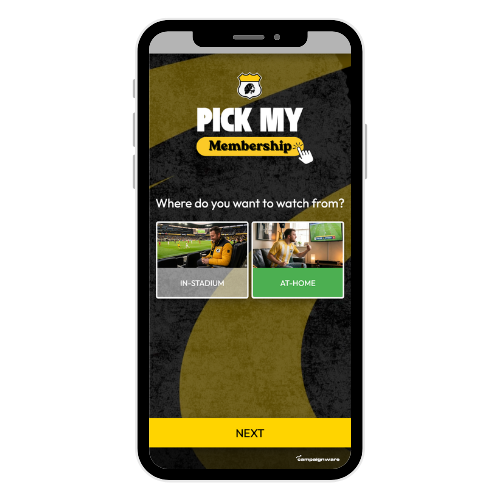
Built on Campaignware's Logic Tree template, the Membership Picker template centralises and simplifies the selection process for sports teams, venues, and membership coordinators:
- Frictionless navigation: Fans answer a few simple questions to get a personalised recommendation.
- Layout: Built on a layout designed by a major sports customer, tested to convert right out of the box.
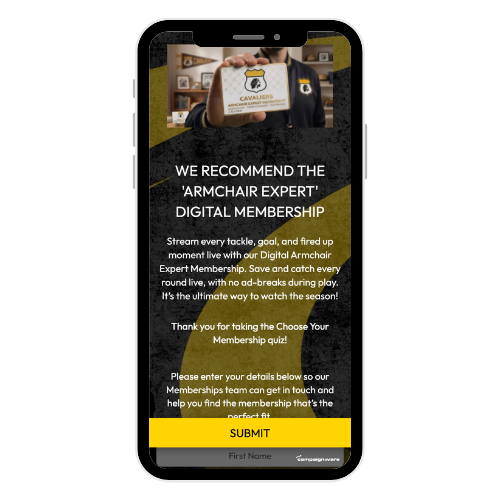
- Click throughs: Fans can click directly through to the sales page once they receive their outcome.
- Zero-party data: Automatically collect email addresses and preferences before revealing the results.
- CRM-ready: Send leads directly to your database for smart follow-up campaigns.
TL;DR: why sports clubs need a Membership/ Ticket Picker
- Turbocharge your highest selling products: Push your top performers.
- One simple path: Replace massive, confusing pricing tables with a single guided flow.
- No more decision fatigue: Help undecided fans make a clear choice without feeling overwhelmed.
- Higher conversion rates: Personalised recommendations build purchase confidence and lower cart abandonment.
- Valuable fan leads: Collect permissioned preference data for your team to immediately follow up on, or to fuel smarter marketing all year round.
Why we built this?
Sports clubs often present fans with too many choices. When a team offers twenty different seating zones, five ticket packages, and endless membership options, fans experience decision fatigue.
Research shows that choice overload leads straight to cart abandonment. Shoppers feel mental exhaustion when they face too many choices. This fatigue causes indecision, frustration, and lost sales. (aptos.com)
In contrast, guided selling tools lift conversion rates. A product recommendation quiz acts like a digital concierge. It narrows down the options for the fan. Personalised quizzes can boost conversions by over one hundred percent. They guide undecided shoppers directly to the right product and remove the stress of choosing. (digioh.com)
We built the Membership Picker template because our sports customers asked for an easier way to sell.
We developed this layout alongside one of our major sports clients. Because of this, the flow is already perfectly suited for sports organisations.
Key tips to launch your first picker fast
We recommend sticking to the optimised layout as it is made to work right out of the box. Simply add in your own package names, images, links, creative and copy.
- Keep questions short: Ask three to five questions at most. If your quiz is too long, fans will drop off before they see their results, and it is harder for you to build and manage.
- Focus on fan intent: Ask what matters to them (e.g., "Do you want to attend every match or just a few?"). Do not focus on complex technical specs or seating row codes.
- Offer one clear result: Give them one or two strong recommendations at the end instead of a long list. Too many options on the results page will recreate the original choice paralysis.
- Capture zero-party data: Ask for an email address to send the result or unlock a special ticket discount.
- Stick to the layout: The Membership Picker layout is already optimised for conversions. Keep the core design and just swap in your branding.
- Connect your follow-ups: Ensure your CRM is linked so you can target fans who completed the picker but did not complete checkout.
How distribution and updates work on match day
- One link, everywhere: Share the picker link in your pre-game emails, calendar invites, SMS, WhatsApp groups, or social media posts.
- Venue-specific QR codes: Use Campaign Link to print QR codes on seat backs, food and beverage tables, program flyers, and large stadium screens. Fans scan the code during breaks to find their perfect package.
- Real-time edits: If a ticket tier sells out or pricing shifts, update the checkout links instantly in your Campaignware dashboard. The change is live for everyone immediately, and you do not need to print new QR codes.
Six use cases that shine for sports teams and venues
1. The Membership Finder
Memberships are the lifeblood of Australian sport. Help fans navigate between ticketed, non-ticketed, interstate, or even pet memberships. Ask a few quick questions about their location and how often they attend games to direct them to the perfect club membership package.
- KPIs: Starts, completions, click-throughs to checkout, total memberships sold.
2. The Season Ticket Finder
Match die-hard fans with the right season ticket. Ask about their budget, who they attend matches with, and preferred stadium views to direct them to the correct stand.
- KPIs: Starts, completions, click-throughs to checkout, season tickets sold.
3. The Flexible Package Selector
Help casual fans who cannot make every home game. Guide them to three-game, five-game, or weekend-only passes that fit their schedule.
- KPIs: Add-to-cart rate, package sales, email opt-ins.
4. The Family Day Outing Guide
Make it easy for families to book a weekend outing. Ask about their ideal experience (e.g., "close to food stands" or "near the kids' play zone") to recommend family friendly seating blocks.
- KPIs: Scans at venue, time on page, cart conversion rate.
5. The VIP Hospitality Matcher
Identify high-intent leads for corporate suites and premium boxes. This acts as a digital qualifying tool for your corporate sales team, replacing cold calling with warm, informed outreach.
If you need to manage your guests after they book, read our guide on "Introducing the Corporate Hospitality Hub template_3".
- KPIs: Qualified corporate leads, corporate suite bookings, pipeline value.
6. The Merchandise Size and Style Picker
Guide fans to the correct jersey size, fit, or player name. This builds buying confidence and cuts down on expensive returns for your merchandise department.
- KPIs: Merchandise sales lift, return rate reduction, basket size.
Which Campaignware templates pair well with the picker?
- Tipping (Pick 'Em) Leaderboard Contest: Keeps fans returning to your digital channels each week, building the relationship before you pitch memberships.
- Moment of the Match Fan Vote: Gathers easy, high-volume data on match day by letting fans vote for their favourite play.
- Spin-to-Win Giveaway: Use this to offer a reward or concession coupon to fans who complete the Membership Picker. For more ideas on how to use instant win games, see "13 Brand Activation Plan Examples to Boost Your Campaign Success_3".
- Corporate Hospitality Hub: Excellent for premium suite holders to access parking maps, menus, and service contacts.
- Product Finder Quiz: Similar logic to the membership picker, but designed for retail. For retail specific ideas, check out "35 Best In‑Store Activations to Boost Your Brand Engagement_3".
Set-up in minutes
- Select the template: Open your Campaignware dashboard and choose the Membership Picker.
- Update the branding: Add your club colours, logos, and fonts. Change the text to match your team's voice.
- Link your products: Add your specific membership packages to the result pages and link buttons directly to your checkout.
- Publish and share: Generate your Campaign Link QR code and place it across your stadium, social channels, and print marketing material.
Lessons learned
- Simple choices beat complex spreadsheets: Keep the decision path clear and simple to avoid cart abandonment.
- Ask before you pitch: Learn what your fans need first, then present the correct solution.
- Trust the proven layout: Save development time by using a flow developed by real sports marketing experts.
- Connect your data flow early: Sync your picker directly to your CRM to catch and nurture every lead.
Ready to simplify your ticketing process and grow your membership database? Try the Membership Picker template on Campaignware today.
Sources
- Digioh: Personalised quizzes can boost conversion rates by over 100 percent. (digioh.com)
- Aptos: Shopper decision fatigue leads to indecision, lower satisfaction, and purchase abandonment. (aptos.com)
- PwC 2025 Customer Experience Survey: Personalisation and thoughtful experience design are increasingly important to customer loyalty and fan engagement. (pwc.com)
- Campaignware product and template pages referenced for features and examples. (campaignware.com)
Note on regional differences: Check local promotion and data privacy laws before you launch. Align your campaigns to your peak sports season.
%2520%2520(800%2520%25C3%2597%2520600px)%2520(4).png)
%2520%2520(800%2520%25C3%2597%2520600px)%2520(2).png)
.png)