












Updated October 2026: we've added the UK and EU rules to check before you launch.
In-store activations are short, interactive brand experiences that shoppers join in the aisle, usually by scanning a QR code on a shelf, screen or poster. The best ones are quick to join, rewarding to finish and easy to measure. Below are 29 in-store activation ideas for brands and retailers, each with the template to run it on. Also called instore or retail activations, they work the same way in UK and European supermarkets as in Australian ones.
Key takeaways
- Keep it under a minute: 30 to 60 seconds from scan to reward gets the most people taking part.
- Put the QR code where the decision happens: the shelf, the endcap, the counter or a screen.
- Link the in-store activation to a purchase, for example with receipt upload, so you measure sales, not just scans.
- Capture consented data with every entry, so you can reach shoppers again after they leave the store.
Why do in-store activations work?
The store is where buying decisions happen. A short digital experience at the shelf gives people a reason to stop, try and buy, and gives your brand data it owns.
- Shoppers still want stores. Gen Z still prefers to shop in person, according to Retail Dive.
- Stores drive discovery. Physical retail prompts impulse discovery and gives people a reason to linger, as eMarketer reports.
- Scanning is normal. Retail is moving to 2D barcodes, such as QR codes, at the checkout by 2027 through GS1 Sunrise 2027, so scan-and-play feels natural to shoppers.
- The data is yours. Consented, first-party data from an in-store activation doesn't depend on ad platforms, so it keeps its value for loyalty and remarketing.
Example: Reese's Scream 7 spin and win in Australian supermarkets
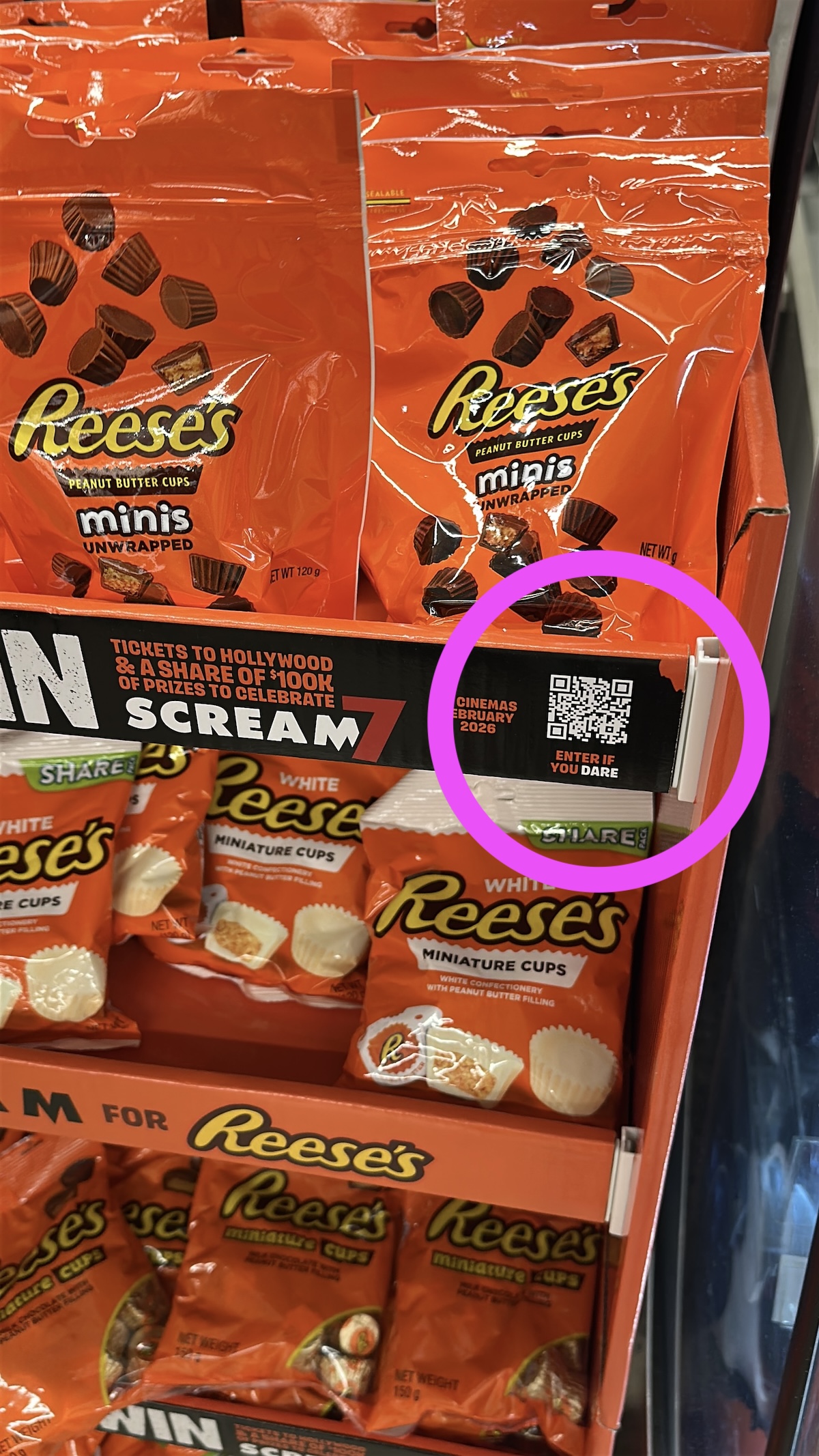
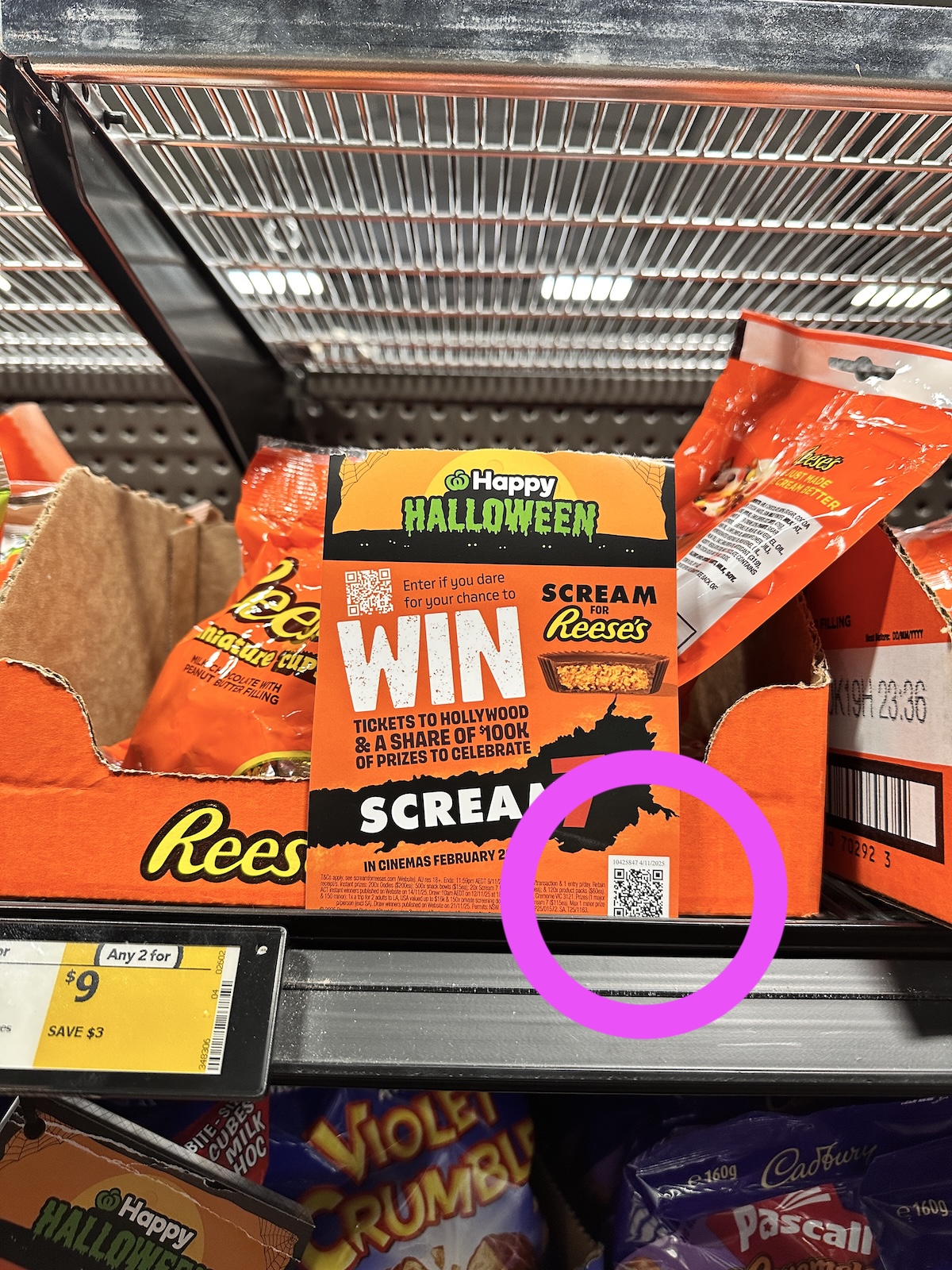
Bastion used Campaignware to run a Scream 7-themed spin and win for Reese's in the confectionery aisles of Coles, Woolworths and IGA. Shoppers scanned a QR code on shelf wobblers and aisle fins, spun the wheel, then uploaded a receipt to verify their purchase. Campaignware Studio built it on the spin and win template: about 70% was built on the existing platform and 30% was customised. Read the Reese's Scream 7 case study.
How do you make an in-store activation work?
- Keep it fast. Aim for 30 to 60 seconds from scan to result. Short, simple mechanics get the most people taking part.
- Reduce friction. Put QR codes on shelf talkers, wobblers and screens. Shoppers expect to scan, so skip the app download and the long form.
- Make the value clear. Show the reward up front, with the odds or prize caps. Being open about it builds trust.
- Close the loop. Send a follow-up email with saved picks, recipes or an offer, to bring people back for the next visit.
- Promote it beyond the store. Use social, email and your website to send people in store, as Reese's did with social ads.
Running an in-store activation in the UK and EU
The ideas below work in UK and EU stores too. Before you launch, check these points with your retail partner and your legal team. This is general guidance, not legal advice.
In the UK
- State the key terms up front. The CAP Code, which the Advertising Standards Authority enforces, says a promotion must show its significant conditions, such as the closing date, how to enter, the prizes and any proof of purchase, before people take part.
- Pick winners fairly. Instant wins must be awarded at random, and you need to be able to show that with an independent check. Winners should know straight away what they've won and claim it at no cost.
- Purchase to enter is allowed. Prize draws that need a purchase are lawful across the UK, including Northern Ireland since 2022, as long as the product price isn't raised to cover the promotion.
- Check the HFSS rules for food and drink. Larger retailers can't place products high in fat, salt or sugar at checkouts, aisle ends or store entrances in England, and similar rules started in Wales in March 2026 and Scotland in October 2026. England also restricts multibuy and extra-volume deals on these products, as the Association of Convenience Stores explains. A QR code on pack or on the shelf in the aisle doesn't rely on those prime spots.
- Ask for consent to market. Under UK GDPR and PECR, you need a shopper's consent before you send them marketing emails, so add a clear opt-in to the entry form.
In the EU
- Check the rules in each country. Prize promotions are mostly governed by national law, so permits, notifications, prize limits and whether a purchase can be required differ from one EU country to the next, as this guide to promotional games in the EU shows.
- Purchase to enter is allowed in principle. The EU Court of Justice ruled in 2010 that a country can't ban outright promotions that require a purchase, because EU consumer law sets the standard (case C-304/08). National lottery and gambling laws can still apply.
- Winning must be free. You can't tell shoppers they've won if they then have to pay anything to claim the prize, even the cost of a stamp, after a 2012 EU Court of Justice ruling.
- Ask for consent to market. Under GDPR and the ePrivacy rules, you generally need consent before you send marketing emails, so add a clear opt-in to the entry form.
Campaignware campaigns can include age verification and data capture set up for the rules in your market, including the UK and EU.
29 in-store activation ideas
Every idea below can start from a QR code on a poster or screen that opens a mobile page. Most run on a ready-made template in the campaign builder. If an idea needs a custom build, Campaignware Studio can build it.
1. Spin to win prize wheel
Shoppers scan a QR code and spin for an instant reward. It works best next to a new product display. The Wests Group used a spin and win for Coca-Cola across its venues: see the Wests Group case study. Template: spin and win.
2. Scratch and win
A digital scratch card with a small instant treat. It's a good way to lift traffic on quieter weekdays. Run it with: the spin and win template for instant prizes, or a custom scratch card from Campaignware Studio.
3. Receipt upload reward
Reward verified purchases with bonus entries, points or a cashback offer. Checks on eligible products and purchase dates cut fraud and show you what people bought. Template: receipt upload.
4. Product finder quiz
Ask a few questions and recommend the right product, with a coupon at the end. Template: a quiz set up to recommend a product.
5. Live aisle poll
Ask “Which flavour should we stock next?” and show the live results on a small screen, so passing shoppers see others taking part. Template: polling and voting.
6. Shopper photo wall
Invite shoppers to post a photo or short review that appears on a moderated wall on your in-store screen or website. Sports Breaks used a moderated fan photo and video wall to grow a database of fans outside Manchester to market its travel packages to. Template: user-generated content.
7. Instant prize draw
One-tap entry, with winners announced every hour to bring people back to scan again. Template: sweepstakes.
8. Mystery box reveal
Shoppers play a short branded minigame, then reveal one of three surprise offers. It builds anticipation at the shelf. Run it with: Minigames, our branded arcade-style minigames made for mobile, linked to rewards and offers.
9. Endcap minigame moment
A 30-second branded minigame tied to the featured product, with the top scores winning. It's inspired by Aisle Dash, the catch-the-falling-products minigame MKTG ran with Campaignware for Chemist Warehouse at State of Origin. Run it with: Minigames.
10. Gift with purchase claim page
Replace paper vouchers with a mobile claim page. Shoppers upload their receipt and claim the gift in one flow. For example, Reese's ran a Scream 7 spin and win in Coles, Woolworths and IGA in Australia, with receipt upload to verify each purchase. Template: receipt upload.

11. Store-only drops
Release a limited number of codes in store at set times, all collected on one mobile hub. Run it with: Omnihub, our hub template that brings several digital experiences together in one branded page, with a spin and win or prize draw for each drop.
12. Sustainability pledge wall
Shoppers pledge to refill, recycle or repair, and get a refill discount in return. Template: message wall, with a Campaign Link QR code at the refill station.
13. Try and rate station
After sampling, customers rate the taste or feel, and the combined ratings show on screen. Template: polling and voting.
14. Exit survey
Three questions at the door give you real-time satisfaction scores and product feedback, with answers going into your CRM. Template: forms.
15. Product picker for specialty retail
Let shoppers pick their perfect set-up for beauty, fitness or tech, the way fans pick a team. Template: a team selector, with products in place of players.
16. New line vote
Let customers vote for the next colour or flavour, and collect emails for launch reminders. Template: polling and voting.
17. Staff challenge
Friendly competition between staff for sign-ups or sales, shown on a back-of-house screen. Run it with: a trivia quiz on the new range with a leaderboard, or a custom sales leaderboard from Campaignware Studio.
18. Repair or care bar
A quick diagnostic quiz that recommends the right accessory or care kit. Template: a quiz set up to recommend a product.
19. Kids' trail
A family scavenger hunt around the store, with a sticker at each stop and a small prize at checkout. Run it with: a Campaign Link QR code at each stop, or a custom trail from Campaignware Studio.
20. Local artist vote
Shoppers vote on next week's featured design, and you ask for a postcode and preferences as they enter. Template: polling and voting, with a user-generated content gallery of the designs.
21. Community wall
Shoppers share tips or recipes. Moderate the entries, then show the best on screen. Template: message wall.
22. Match my routine quiz
Beauty and wellness customers answer a few questions and get a tailored routine, with a basket list sent to their inbox. Template: a quiz set up to recommend a product.
23. Test drive scoreboard
A branded minigame in your demo area, with a public high-score table and hourly prizes. Run it with: Minigames, with a leaderboard.
24. Instant samples with opt-in
Shoppers scan to claim a sample at the counter and opt in to follow-up offers. Template: forms.
25. Price confidence check
Shoppers scan to see value comparisons or your price guarantee, and sign up for alerts on future price drops. Run it with: Omnihub for the information, with a form for sign-ups.
26. Store-exclusive collectables
Digital badges or stickers that shoppers collect by scanning at set zones in store. The Sydney Sixers ran the same idea at the SCG, where fans scanned QR codes around the stadium to collect signed player digital collectables. Run it with: Campaign Link QR codes for each zone, or a custom build from Campaignware Studio.
27. Partner takeover day
A brand partner hosts a branded minigame and an instant prize draw on your screens for the day, with a QR code to join. The same format works at stadiums and live events. Run it with: Omnihub, with a sweepstakes and Minigames.
28. Click and collect surprise
Customers picking up orders scan a QR code for a small gift or coupon, which gives them a reason to add to their order. Template: spin and win.
29. Micro-course or demo quiz
A short tutorial, then a 3-question quiz that rewards shoppers with a pro tip card or an accessory discount. Template: trivia.
How to run an in-store activation with Campaignware
- Pick a template. Choose the mechanic that fits your goal: the spin and win template for instant prizes, the receipt upload template to verify purchases, or the user-generated content template for shopper photos and reviews.
- Put it in your brand. Add your logo, colours, fonts and creative, so it looks like part of your in-store display, and run it on your website or your own web address.
- Set prizes and terms. Add your prizes, win odds and stock levels, terms and conditions, and the data fields you need.
- Share it. Create Campaign Link QR codes for shelves, screens and receipts, and promote it on social, by email and in your app. Every code is tracked, and you can change where it points without reprinting.
- Collect consented data. Every entry adds a contact you can reach again, and the data goes into your CRM.
- Report the results. Use the reporting in the platform, such as impressions, unique users, clicks and completion rates, to show your team or your retail partner what worked.
A typical campaign takes 20 to 40 minutes to build, and most campaigns go live in under an hour. Ideas that need a custom build come from Campaignware Studio, faster than you'd expect. See how brands use Campaignware for brand activation, from product launches to events.

How do you measure an in-store activation?
- Participation rate: scans to starts
- Completion rate and average time on page
- Reward claims and add-on sales at the till
- Emails or loyalty sign-ups captured with consent
- Dwell time near endcaps
- Product-level uplift and basket size
- Repeat visits driven by stamp cards or limited drops
Planning corporate activations for events and hospitality too? See our 10 corporate activation ideas.
Frequently asked questions
What is an in-store activation?
An in-store activation is a brand experience that shoppers take part in while they are in a store. Most now start with a QR code that opens a mobile page, such as a spin and win, a quiz, a vote or a prize draw. Done well, it lifts footfall, dwell time and sales, and captures consented data you can use after the shopper leaves.
What are good examples of in-store brand activations?
Good in-store brand activations are quick and tied to a purchase. Reese's ran a Scream 7 spin and win in Coles, Woolworths and IGA, with receipt upload to verify purchases. Other strong formats are instant prize draws, product finder quizzes, flavour votes, shopper photo walls and branded minigames at the endcap.
How long does an in-store activation take to launch?
On a template, a typical campaign takes 20 to 40 minutes to build, and most campaigns go live in under an hour. If you'd rather not build it yourself, Campaignware Studio can build the whole thing for you, faster than a traditional agency build.
How do you link an in-store activation to sales?
Make a purchase part of entry. With receipt upload, shoppers buy the product, upload their receipt and get a bonus entry or reward, while automated checks confirm eligible products and purchase dates. You get engagement linked directly to sales you can measure, plus consented data from every verified buyer.
Are in-store prize promotions legal in the UK?
Yes. Instant wins, prize draws and receipt upload rewards are all legal in the UK, including draws that need a purchase, as long as the product price isn't raised to cover the promotion. Follow the CAP Code: state the key terms up front, award prizes fairly and at random, and let winners claim at no cost.
Are in-store prize promotions legal in the EU?
Generally yes, but the rules are set country by country. EU law allows promotions that need a purchase in principle, and winners must be able to claim at no cost. Some countries also need a permit, a notification to the authorities or terms signed by a notary, so check each market with your legal team before you launch.
Ready to plan your next in-store activation? Book a demo and we'll help you pick the right templates, set up your data capture and go live fast. Already have a brief? Talk through your project.