
Introducing: Corporate Hospitality Hub
.png)
Built on Campaignware’s Omnihub, the Corporate Hospitality Hub centralizes your entire event:
- Logistics: Parking, maps, and real-time timings.
- Experience: Menus, Spotify playlists, and live photo galleries.
- Data Capture: Capture data on all guests, not just the hosts.
- Connection: Service team bios and opt-in networking profiles.
- Follow-up: Instant post-event surveys and "thank you" content.
.png)
TL;DR: why Hospitality teams are switching to a Hub
- One link for everything. No more scattered PDFs or last‑minute email chains.
- Live updates without resending. Edit once, everyone sees the change instantly.
- Better attendee experience. A clean, mobile‑first page with wayfinding, service contacts and “who’s who.”
- Pre‑event and post‑event in one place. Build anticipation before, thank and follow up after.
- Add data capture when you need it. Drop in a quick prize draw or survey to learn who attended.
Why we built this?
Corporate hospitality teams still rely on inboxes for live updates. Attendees swim in long threads, versioned attachments and “reply all.”
It’s time‑consuming for staff and frustrating for guests…
One of our customers came to us with the idea of using the Omnihub to create a a Hub specifically designed for a corporatedesigned a corporate box, and we were happy to oblige!
What is the Corporate Hospitality Hub?
It is a pre‑made Omnihub layout tuned for corporate suites and live events.
You get a modern, branded destination that centralises essentials and rich media, from travel information to live photo galleries and playlists, while staying easy to update on any device.
Inside the template: what you can include on day one
- Event overview and schedule
- Important guest information: tickets, seating plan or suite number
- Arrival and parking details with map links
- Hospitality menu and dietary notes data collection
- Service team profiles and contacts (who’s looking after the suite)
- Networking list with guests’ names and LinkedIn profiles
- Venue map and merch locations
- Live photo gallery from the night
- “Get in the mood” Spotify playlist
- Post‑event thank you and survey
- Data capture: add a quick “business card draw” or instant win
These are pre‑configured sections you can customise for your brand, event, sponsors and guest list.
Omnihub’s flexibility makes it simple to turn tiles on or off and add Campaignware templates for engagement and data capture.
Key tips to launch your first hub fast
- Publish early with the basics. Add meeting point, parking, and suite details first; refine during the week.
- Use one QR and one short link. Put them on invitations, lanyards and table tents. Campaign Link gives you branded short links and QR codes in the same flow.
- Make networking easy. Add a guest list with names, companies and LinkedIn profiles.
- Show the “who’s serving you” team.
- Add a mood setter. Embed a Spotify playlist alongside a quick “what to expect” note.
- Map what matters. Pin restrooms, bars and merch stands; link to Google Maps for arrival.
- Capture attendance the friendly way. Drop in a simple prize draw or form so guests can “hand in a digital business card.” Pair with Campaignware’s Sweepstakes or Forms templates.
- Plan the follow‑up. Switch the hero tile to “Thanks for coming” the morning after, add photos and a two‑question survey.
How distribution and updates work on event day
- One link, everywhere:
- Share the hub in calendar invites, SMS, WhatsApp groups and email.
- Print a QR code at the suite entrance and on table toppers.
- Real‑time edits:
- If timings shift or a door changes, update the hub and it is live for everyone straight away. No resend needed.
- Teams using Omnihub report significant time saved on content updates compared with juggling multiple tools.
- Suite‑specific views:
- Create unique hubs or tiles per suite if you need tailored details or sponsor content.
- Analytics and handover:
- Track engagement and clicks, then export leads post‑event via your integrations
- Duplicate for the next event:
- Duplicate the Hub over and over again and rebrand for the next event, or for the next round.
Real‑world example: Qudos Bank Arena
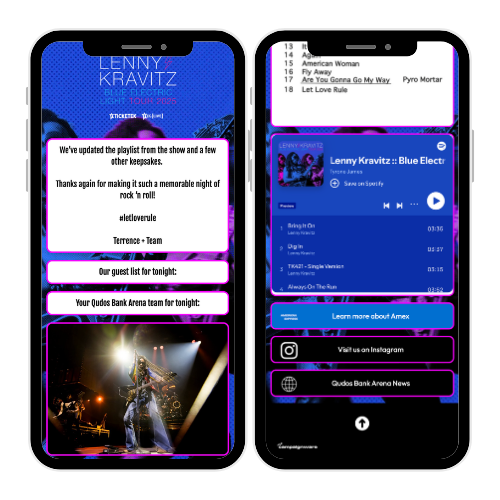
For a recent Lenny Kravitz show, Qudos Bank Arena used this approach for their corporate suites:
- Pre‑event: guests could see who else was attending, with LinkedIn profiles for smooth introductions; parking and arrival notes; the QBA service team on duty; venue and merch locations; and a Spotify playlist to set the tone.
- After: the content switched to “thanks for attending,” with photos from the night and simple next steps. Guests told the team on the day how much they loved the experience and the clarity the hub provided.
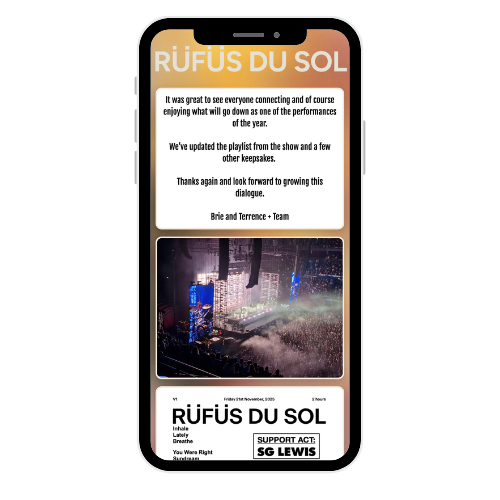
This exact template was reused a few nights later for another show (Rüfus Du Sol)
Four use cases that shine in corporate hospitality
- Networking made natural: With an attendee list and opt‑in privacy controls, the hub helps people connect before they meet in person. Event “attendee hubs” are now a standard way to centralise details and enable networking through a single, personalised view.
- Less inbox noise: Replace long update chains with one live page. Even small cuts to email volume matter when most of a workday is spent scanning messages.
- Rich media in context: Embed livestreams, videos or music into a branded, mobile‑first layout so everything sits together.
- Sponsors and partners: Give sponsors a tile with logo placement, offers and links. Add a quick poll or instant win to drive interaction and capture consented data.
Which Campaignware templates pair well with the hub?
- Business card draw or instant win: Use Sweepstakes or Spin‑to‑Win to encourage fast opt‑ins without friction.
- Live photo gallery: Curate and display best shots from the suite in a moderated UGC Content Wall.
- Quick polls and votes: Let guests vote on “song of the night” or “player of the match” and show results later.
- Micro‑survey: A two‑question feedback form linked from the “Thanks” tile keeps it light and useful.
Set‑up in minutes
- Pick the Corporate Hospitality Hub template and brand it with your logo, colors and cover image.
- Add essential tiles: Arrival and parking, Suite details, Service team, Networking, Venue map, Playlist.
- Drop in optional tiles: Photo gallery, prize draw, sponsors, menu downloads, post‑event survey.
- Share one short link and QR code from Campaign Link. Update anytime; changes are live.
Lessons learned
- Keep a single source of truth. One link avoids version confusion.
- Prioritise wayfinding. Parking, gates and suite info save the most questions.
- Make intros easy. A light‑touch, opt‑in networking list does the job.
- Switch to post‑event early. Thank guests the next morning while the night is still fresh.
- Capture value with care. Prize draws and micro‑surveys add insight without slowing the night.
Ready to centralise your corporate events in one live, branded hub? Book a demo and ask for the Corporate Hospitality Hub template.
%2520%2520(800%2520%25C3%2597%2520600px)%2520(4).png)
%2520%2520(800%2520%25C3%2597%2520600px)%2520(2).png)
.png)